Modules in Python

Creating Modules
As our program grows we should split our code across multiple files. We refer to each file as a module. A module should contain related data, functions, and objects.
def calc_tax():
    pass

def calc_shipping():
    pass
Importing a module
Now we can import those functions to this file.
# import
from sales import calc_tax

# use it
calc_tax()

# ==============================

# import multiple functions
from sales import calc_tax, calc_shipping

# ==============================

# import everything
from sales import *
another way of importing
# import
import sales

# use
sales.calc_tax()
Even if we imported only one function then also the entire module needs to be loaded.
Compiled Python Files
When we will compile the app.py file using the command python app.py then python will create a folder names __pycache__
In this folder, there will be a compiled version of the module that you just imported in the app.py file.
This is done to speed up compilation. And this will speed up the loading of the module.
This will not speed up the performance of the program.
app.py is not cached because the entry file is always recompiled.
Module Search Path
If the python compiler does not find the module in the current folder then it will search for the file in a bunch of predefined folders.
The built in modules like sys are kept in these folders.
Package
Packages are used if the file that we want to use is inside a sub folder.
The folder structure looks like this.
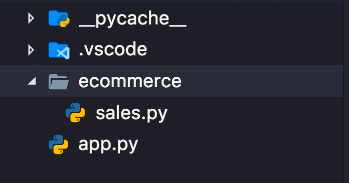
We can not do this -
# we can not do this
from ./ecommerce/sales import tax
We have to create a __init__.py file in the ecommerce folder. When we create this file then python will think of this folder as a package.
A package is a folder that contains one or more modules.
So a module is a file and a package is a folder.
The __init__.py file is empty.
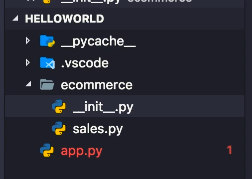
Now you can import and use it in three ways
# way 1
import ecommerce.sales

ecommerce.sales.tax()

# =========================
# way 2
from ecommerce.sales import tax, sales

tax()

# =========================
# way 3
import sales from ecommerce

sales.tax()
Sub-packages
Now we have to create another __init__.py file in the sub folder also
Our folder structure is like this
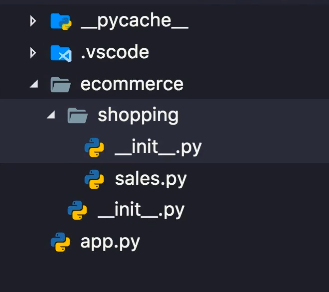 now import like this
from ecommerce.shopping import sales
Intra Package Reference
This simply means, using one package into another package.
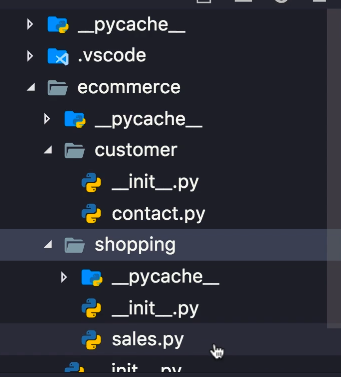
In our sales modules, we want to use the contact module.
we can use absolute import
from ecommerce.customer import contact
contact.customer()
we can use relative import
from ../customer import contact
contact.customer()
The dir Function
This function will give us all the functions that are defined in a module
from ecommerce.shopping import sales

print(dir(sales))
some functions such as__name__ , __package__ , etc are already defined for us.
print(__name__)
print(__package__)
print(__file__)

'''
These functions give us the file name of the module,
the package name and the address of the module
'''
The name of the module that starts our program is always
__main__
Comments
Join the discussionNo comments yet. Be the first to comment.